Getting started with Tilde Event Assistant
Tilde Event Assistant is an AI-powered solution designed to transcribe and translate spoken content at events in real-time, enhancing accessibility and engagement for all attendees.
Guides
Explore our guides to learn how to use different parts of Tilde Event Assistant.
- Event organizer view:
- Event attendee view
Quick start guide
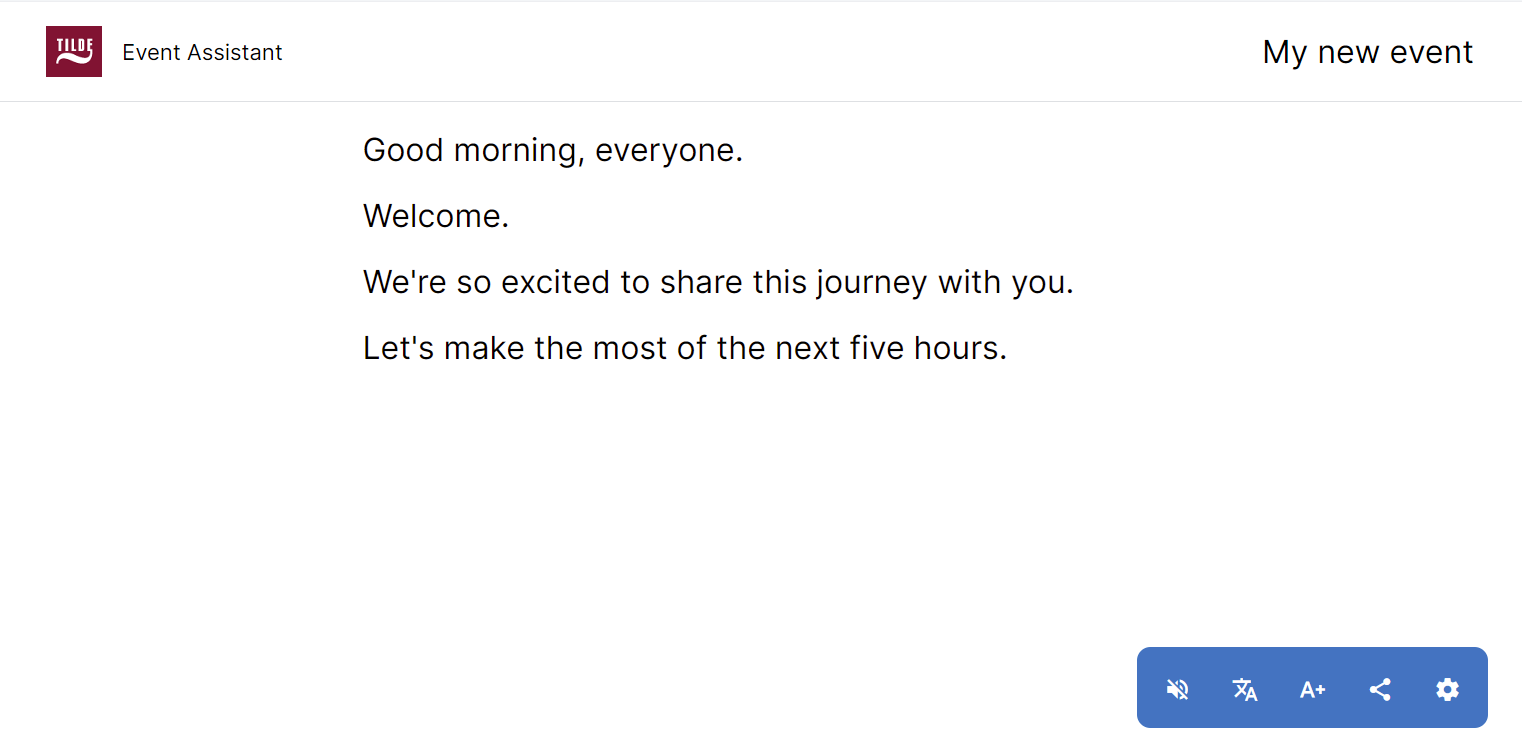
Get started in few simple steps:
- Set up your event: Quickly add essential details like event name, speaker language, and desired translation languages.
- Start transcribing: Ensure a stable internet connection and clear audio input for optimal transcription accuracy.
- Share and enjoy: Share the link/QR code to the event with attendees. They can easily customize their reading experience by adjusting screen size and language preference.
- After the event: Download event transcript or summary.
The Event Assistant requires a computer with a microphone and a stable internet connection. For optimal speech recognition accuracy, we recommend using a high-quality microphone with background noise reduction. The quality of your audio input significantly impacts transcription results.
Frequently asked questions
What is Tilde Event Assistant?
An AI-powered solution for real-time transcription and translation at events.
How does it work?
Tilde Event Assistant uses advanced speech recognition technology to convert speech into text. It then translates this text into multiple languages, displaying it on screens or personal devices.
Which languages are supported by Tilde Event Assistant?
Tilde Event Assistant can translate and transcribe content into any language. Contact us to request language pairs you might need for your event.
Can this solution be used for any event?
It can be integrated into various types of events, including conferences, seminars, workshops, and cultural gatherings, to ensure that everyone can fully participate.
Is Tilde Event Assistant compliant with accessibility regulations?
Yes, Tilde Event Assistant meets the latest EU Accessibility Directive requirements, making it a great choice for event organisers aiming to provide inclusive and accessible experiences.
How can organisers integrate Tilde Event Assistant into their events?
Organisers can easily integrate Tilde Event Assistant by connecting it to their event’s audio system and digital displays. Our support team is available to help with setup and ensure everything runs smoothly.
What are the benefits of using real-time captioning for events?
Organisers can use Tilde Event Assistant to make their events more accessible to a global audience, comply with accessibility laws, and enhance the overall attendee experience by providing real-time transcriptions and translations.
Do attendees need to install anything to use Tilde Event Assistant?
No, attendees do not need to install any special software. Transcriptions and translations can be accessed directly through any standard web browser on personal devices or displayed on venue screens.
Is there a trial available for Tilde Event Assistant?
Yes, we offer a trial period and a demo for new users to experience how Tilde Event Assistant can transform their events. Contact our sales team team for more details.
How is the privacy of the event content handled by Tilde Event Assistant?
Tilde Event Assistant ensures the utmost privacy and security. All transcriptions and translations are processed in real time without storing any personal information or content unless specifically requested by the organiser for archival purposes.
How to connect to virtual meetings?
Download VBCable from the official website:
Install the installation package:

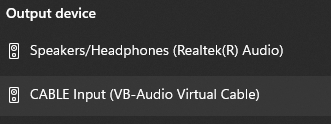
After the package is done installing, under sound settings, select CABLE Input (VB-Audio Virtual Cable):
For the solution to work, it is necessary to disconnect headphones and other equipment with a microphone, for example, a camera.
There is no difference whether Transcribe is run first and then Teams/Zoom, or vice versa.
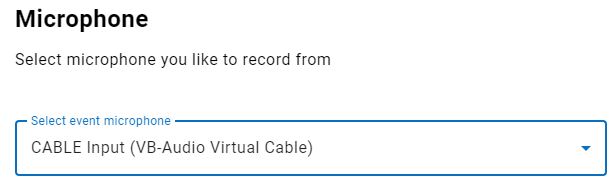
In Event Assistant, choose this microphone:
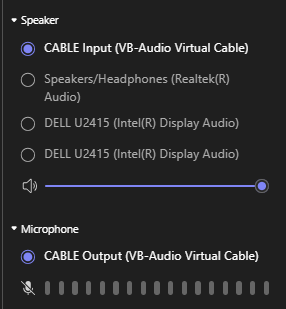
In Zoom or Teams settings, the Input/Output device needs to be adjusted to VB-Audio Virtual Cable:
Known problems with the solution
While the solution is active, using your standard microphone or other audio sources is generally impractical. This is because you will not be able to use your physical microphone or hear other participants. Therefore, worrying about standard headset functionality is not a high priority while transcribing.
If you connect a USB headset while Transcribe is already running, the solution will continue to work. However, if you then disconnect the USB headset, Transcribe will stop working and must be restarted.
If your headphones are already connected before launching Transcribe, they should theoretically not interfere, provided that you correctly configure the Input/Output settings in Teams/Zoom to the VB-Audio Virtual Cable device.